Watches
A routine runs at set times. A watch waits for something to happen: a price to drop, a page to change, or an email from someone you're waiting on. Then it wakes your agent, or just tells you.
Two kinds
- A web page
- The agent picks one thing on a page, such as a price, and checks it now and then. It can wake when the value changes, goes above or below a number, or contains certain words. Readings can be kept in a table in the agent's Library, so you can see the history.
- Your Gmail
- Wakes the agent when a new email matches: from a person or a whole company, with certain words in the subject, in a thread, or with a label. The agent is told which email it was and reads it with its own Gmail access; mail that you or your agents sent doesn't count.
How a watch starts
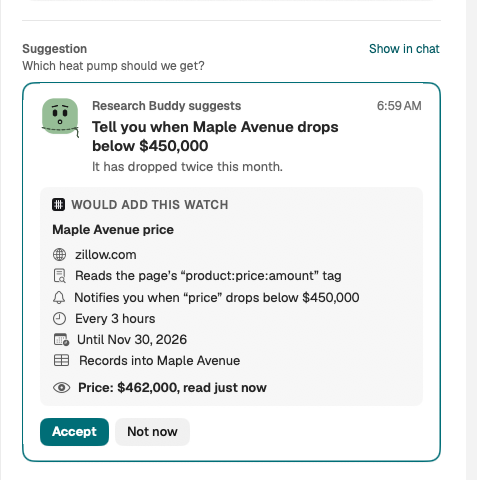
Ask in chat, in plain words: "Tell me when this jacket is under $80", or "When the landlord writes, draft me a reply". The agent suggests a watch, and nothing starts until you say yes. The suggestion shows:
- what it watches: the Site or Mail;
- When it fires;
- what happens then: it wakes the agent to do what you agreed, or only notifies you;
- What this allows.
The agent can also suggest changing or removing a watch. Those wait for your yes too.
When it fires
A watch that wakes the agent starts a short run, and what it found shows in the agent's chat. Anything the run needs your OK for, like sending an email, waits for you as usual, under Needs you. A watch can wake its agent only a few times a day; past that, you're told instead.
Seeing and changing watches
An agent's watches are listed beside its routines, in its Settings under Routines and watches. Each shows what it reads and its last reading. Pause, Resume or Remove it there. Removing a watch stops the checks; what it recorded stays in the Library.
If a page changes so much that the value can't be found any more, the watch stops checking and says so. Ask the agent to fix it. If a check needs you, for example a sign-in that expired, it waits under Needs you.
Watches check from your Mac, while Loom is open. Nothing about your mail goes to our service to do this.